
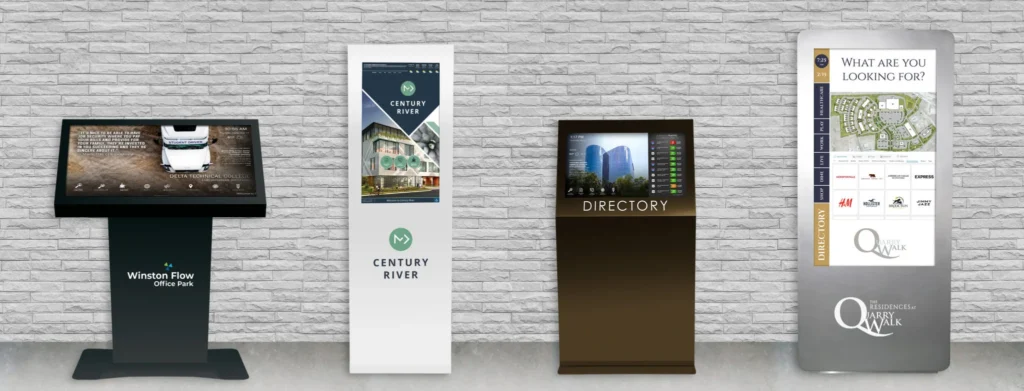
A digital kiosk is an interactive touchscreen display that helps users find information, navigate spaces, and engage with services in real time. Commonly used in malls, hospitals, office buildings, government buildings, and campuses, digital kiosks streamline wayfinding, display directories, and improve overall visitor experiences without requiring staff assistance.
For businesses, digital kiosks do more than provide information—they reduce operational friction, improve communication, and create more efficient, self-service environments. From guiding visitors to the right location to showcasing announcements or promotions, kiosks offer a modern, scalable way to enhance both customer experience and on-site operations.
What Is a Digital Kiosk?
A digital kiosk is an interactive, touchscreen display designed to deliver information, guide users, and streamline in-person experiences. Commonly found in places like shopping centers, hospitals, office buildings, and campuses, digital kiosks help visitors quickly find what they need—whether that’s directions, directories, announcements, or services—without relying on staff assistance.
Unlike static signage, digital kiosks are dynamic and software-driven, allowing businesses to update content in real time and tailor experiences based on location or audience. Many kiosks include features like wayfinding maps, search functionality, ADA accessibility options, and integrations with building data or tenant directories. The result is a more efficient, user-friendly experience that improves navigation, reduces confusion, and enhances overall customer satisfaction.
Essential Features of a Digital Directory Kiosk
A digital directory kiosk is more than a static list—it’s an interactive system designed to help visitors quickly find information and navigate complex spaces with ease. Key features typically include:
- Searchable Directory: Quickly locate tenants, departments, or points of interest with intuitive search functionality.
- Interactive Wayfinding Maps: Step-by-step directions guide users from their current location to their destination.
- Real-Time Content Updates: Instantly update tenant listings, room changes, and announcements without manual replacements.
- Multi-Language Support: Provide a more inclusive experience for diverse audiences and international visitors.
- Accessibility Features: Designed with ADA-compliant functionality to ensure usability for all users.
- Custom Branding & Promotions: Incorporate brand elements, messaging, and advertising opportunities directly into the interface.
- System Integrations: Connect with building directories, scheduling tools, or data systems for more dynamic, accurate information.
Together, these features transform a digital directory kiosk into a central hub for navigation, communication, and engagement within any environment.
Not sure which kiosk fits your space? Compare kiosk sizes and specs →

Where Digital Kiosks Help Most
| Setting | How digital kiosks help |
|---|---|
| Office buildings | Help visitors find tenants, amenities, and meeting spaces |
| Healthcare | Simplify check-ins and guide patients to services |
| Retail | Combine wayfinding with on-site advertising and promotions |
| Government buildings | Direct visitors to the correct rooms, services, or departments |
10 Benefits of Using Digital Kiosks
Here are 10 ways digital kiosks help businesses and public facilities.
1. Digital Kiosks Can Help Reduce Business Costs
Interactive kiosks can help your business save money by reducing the need for a large front-desk or customer service team. As a result, employees can focus on the work that matters most to your operation, and you free up budget for other priorities.
2. Touch Screen Kiosks Improve Business Efficiency
Digital kiosks give customers convenient, self-service access to information, check-ins, and transactions. By reducing reliance on staff, they streamline interactions, improve efficiency, and give users greater control over their experience.
Available 24/7, touch screen kiosks deliver a consistent, high-quality experience without interruptions. They handle routine questions and tasks, freeing up employees to focus on more meaningful work and higher-value responsibilities.
Strategically placed in high-traffic areas like shopping malls, airports, grocery stores, and office buildings, digital kiosks increase visibility and accessibility. In retail and quick-service environments, they support self-ordering and multiple payment options, helping speed up service and improve operations.
Across industries, kiosks enhance the customer journey. In office buildings, they help visitors find tenants, amenities, and meeting spaces. In healthcare, they simplify check-ins and guide patients to services. In retail environments, they combine wayfinding with on-site advertising. Government buildings use kiosks to direct visitors to the correct rooms, services, or departments.
Overall, digital kiosks improve how people navigate and interact within busy public spaces—making experiences faster, more efficient, and easier for both customers and businesses.
3. Interactive Kiosks Bolster Employee Satisfaction
By eliminating dull tasks that are typically performed by workers, interactive kiosks will improve job satisfaction among your employees. The individuals who help your business operate at peak efficiency will be able to devote their efforts to areas where they can be more beneficial, which will help them feel more accomplished at the end of the day. Improved job satisfaction will lead to happier, more efficient employees, further enhancing the efficacy of your business.
4. Digital Kiosks Boost Sales and Brand Visibility
Perhaps the most appealing reason for using digital kiosks is the uptick in sales that they can help facilitate. Interactive kiosks are remarkably effective marketing tools that can help influence your customers into buying certain products through the use of promotions, packages, discounts, and other enticing offers. The active interaction with customers will encourage them to spend more money than they had anticipated and improve your bottom line.
Digital kiosks ensure brand exposure through their prominent visibility. Being positioned visibly, they attract attention and showcase the brand to a wide audience, increasing brand visibility and recognition. They are positioned visibly and act as intermediaries between businesses and customers, providing a platform for information dissemination and service delivery.
5. Digital Touch Screen Kiosks Offer Fast Investment Return
As a result of your increased sales, digital kiosks will quickly provide a return on your investment. With touch screen kiosks able to immediately have an impact on your sales revenue, you will be able to pay for your addition within no time, meaning remaining cost benefits will all be funneled into your business’ coffers. Here’s how Community Helping Place cut costs and found a long-term sustainable solution with an interactive kiosk.
6. Interactive Kiosks Allow Real-Time Communication Updates
Digital signage kiosk solutions allow you to update information in real time, improving the communication channel between you and your customers. If you have a status update, building directory change, or flash sale you would like to announce, you can rapidly reach your targeted audience by revising the display from the convenience of your office.
7. Customers Receive Instant Satisfaction from Digital Kiosks
Whether using a building directory kiosk to find directions or using an interactive kiosk to make a purchase, customers receive instant satisfaction from the technology. People in today’s climate enjoy being independent and getting things done on their own accord. By placing self-service kiosks inside or outside your building, you allow your customers to achieve the satisfaction they crave while also avoiding lines and wait times.
8. Digital Kiosks Promote Consumer Privacy and Security
As a byproduct of being independent, the modern consumer also values his or her privacy and security. Digital kiosks can help your customers feel safer when making a purchase because they can do so without having to involve others in the transaction. They can maintain a private presence while taking advantage of your company’s goods and services, helping to establish a feeling of trust with your brand.
9. Interactive Kiosks Provide Insights Into Visitor Engagement
Interactive kiosks can provide valuable insights into how visitors engage with on-screen information and features. By analyzing touchscreen interactions, navigation patterns, and content engagement, organizations can better understand what visitors are looking for and which resources they use most. These insights can help you refine kiosk content, improve wayfinding and information access, and create a more useful visitor experience.
10. Touch Screen Kiosks Require Very Little Maintenance
Digital signage kiosk solutions are a relatively turnkey option for your business. TouchSource can provide digital kiosks with all of the necessary software already installed. Once you have placed the kiosks throughout your building, you will not have to think about their operation. The same goes for outdoor touch screen information kiosks — but be sure to watch out for these kiosk installation “gotchas” before you go to install.
Our interactive kiosks require very little maintenance and can run efficiently without any necessary attention. Should something go wrong, most issues are easily remedied so that you can continue to provide your consumers with their customary user experience.
Every advantage is crucial in the current commercial climate, so get a leg up on your competition by installing digital kiosks in your building or facility immediately. By utilizing the interactive technology, you will reduce your costs, improve the satisfaction of your employees and customers, and, most importantly, increase your sales revenue. Visit our Kiosks page to learn more about the various digital signage kiosk options we have available to help your North American business thrive.
See digital kiosks in real installs
Browse photos of TouchSource kiosks and directories in working properties. Filter by Kiosks to compare enclosures and sizes.
Digital Kiosks for Government Buildings
Government buildings serve visitors who need to find the right office, service, or meeting quickly. Digital kiosks direct visitors to the correct rooms, services, or departments. In addition, real-time updates keep directories accurate when offices move, hours change, or new notices go out.
For government facilities, TouchSource offers:
- Interactive wayfinding kiosks: Guide visitors through complex buildings, multi-building campuses, and historic spaces with digital maps and directories.
- Multilingual digital directories: Serve diverse communities with content in multiple languages.
- ADA-compliant design: Hardware and software engineered to meet or exceed ADA standards.
- GSA Schedule pricing: Simplify purchasing and follow government procurement guidelines.
For tighter spaces, the slim Alta kiosk comes in 22″ and 32″ touchscreen or non-touch models and is ADA-compliant.
Learn more about digital signage for government facilities, or review the requirements agencies should plan for.
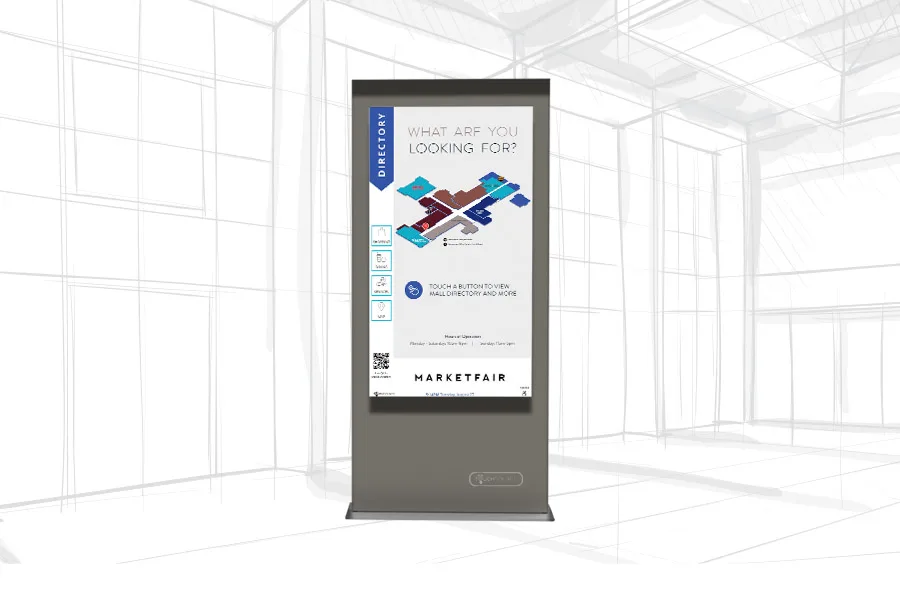
Featured indoor kiosk
Telluride Freestanding Indoor Kiosk
A compact freestanding kiosk with 32″ to 65″ touchscreen or non-touch displays, built for directories, wayfinding, and visitor messaging. It meets ADA requirements for wheelchair access, is easy to secure and relocate, and is made in the USA.
Digital Kiosk Sizes
Digital kiosk and display sizes vary with the intended use. Typical sizes fall into three groups:
| Size | Screen size | Common uses |
|---|---|---|
| Small | 10 to 22 inches | Conference room and elevator signs, digital messaging boards, and building directories for small buildings |
| Medium | 32 to 49 inches | Freestanding or wall-mounted displays and indoor kiosks for building directories, meeting room boards, product showcases, and campus wayfinding |
| Large | Over 50 inches | High-traffic areas like airports, shopping malls, and event venues for advertising, interactive maps, and multimedia |
It’s important to keep in mind that these size ranges are approximate and may vary depending on the offerings of specific manufacturers and customizations. The selection of a particular display size for a kiosk is determined by factors such as the intended purpose, visibility requirements, available space, and user interaction needs.
How Much Do Digital Kiosks Cost?
The cost of a digital kiosk depends on its size, touchscreen or non-touch display, features, customization, indoor vs. outdoor ruggedization, and software.
For example, a single static kiosk may start around $7,000. Final pricing varies with display size, touchscreen or non-touch options, and your software needs.
In general, the more units you purchase at one time, the lower your price per unit. At TouchSource, we deliver standard kiosks that cover a range of needs, which keeps prices lower, and we pass those savings to our customers.


